Print and online friendly item types are traditional questions that students can answer on print and online assessments. They are designed to engage students by allowing them to pick from answer choices, state a numerical answer, or compose short and long constructed responses.
These print and online friendly item types are useful because:
They offer teachers the flexibility to use them across a variety of print and online assessments.
They can be paired with a resource, or reading passage, to demonstrate students’ comprehension and critical thinking.
They help teachers assess whether students have learned facts, can recall information across broad lessons, and can solve problems.
Aware offers the following print and online friendly item types:
Constructed Response
Multiple Choice
Multiple Selection
Numerical Response
Resource
Print and Online Friendly Item Types in Author Assessments
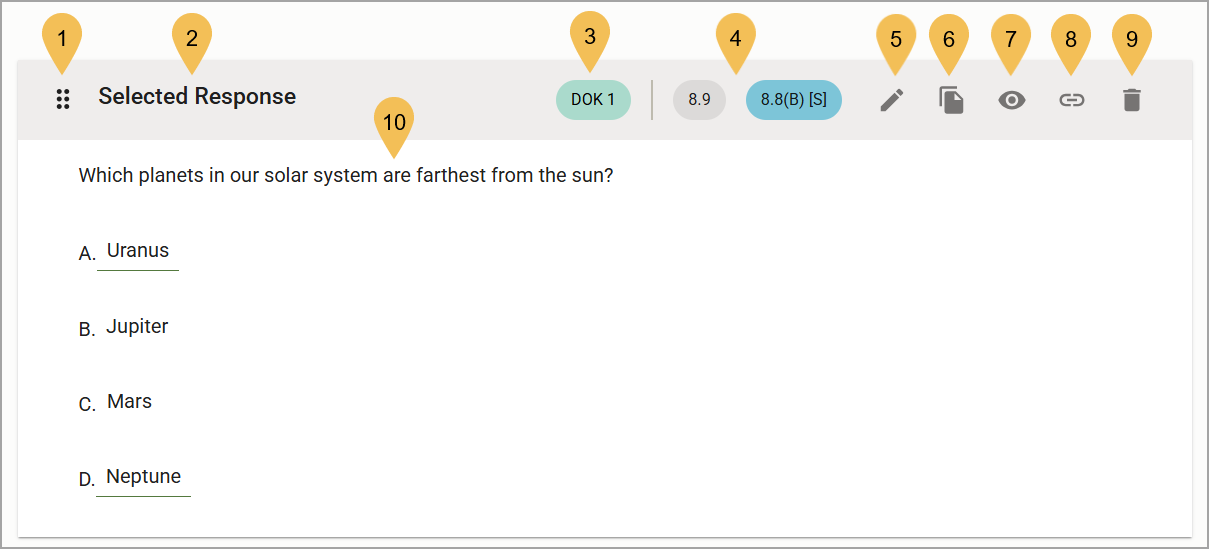
# | Field | Description |
|---|---|---|
1 | Move () | Click and hold this icon to drag the question up or down in the question list. This allows you to change the order in which the questions appear on the assessment. |
2 | Question Type | Indicates whether the question is Selected Response, Numerical Response, Constructed Response, or a Resource. Multiple Choice and Multiple Selection are considered Selected Response types. |
3 | DOK | Shows the Complexity/Depth of Knowledge level, if available. |
4 | Learning Standards | Shows the Primary and/or Secondary Learning Standard if the test author has selected them for the item type. |
5 | Edit () | Opens the Edit Question screen, where you can make changes if needed. |
6 | Copy () | Adds a copy of the question to the assessment. This is helpful if you want to add multiple questions of the same type or using the same text, images, or resources. Be sure to edit the copy so there are no duplicate questions in the assessment. |
7 | Preview () | Opens a preview of the question as a student would see it when taking the assessment. |
8 | Link Question to Resource () | Allows you to select a resource to go along with the question. For example, you can link an excerpt from a story to reading comprehension questions. |
9 | Delete () | Deletes the question from the assessment. |
10 | Question Text and Answer Choices | Displays the question or reading passage and each answer choice, with the correct answer(s) underlined. |