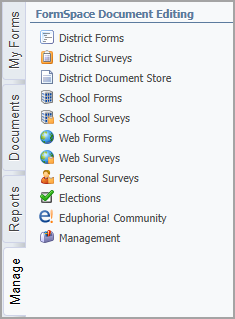
The Manage tab in Formspace serves as the administrative hub for configuring, organizing, and maintaining forms throughout their lifecycle. It provides users with the tools needed to control form structure, manage access, and ensure that each form operates as intended. The Manage tab groups related configuration areas into dedicated screens.
The Manage tab contains the following screens:
District Forms – View, edit, and delete forms used district-wide.
District Surveys – View, edit, and delete surveys used district-wide.
District Document Store – Manage the documents and downloadable attachments that appear on the Documents tab.
School Form – View, edit, and delete forms for a specific school.
School Surveys – View, edit, and delete surveys for a specific school.
Web Forms – View, edit, and delete forms that are shared with users via a link, website, or email.
Web Surveys – View, edit, and delete surveys that are shared with users via a link, website, or email.
Personal Surveys – Manage surveys that are owned and controlled by the individual staff member who created them.
Elections – Manage elections, which allow recipients to vote on issues at a school or district. This might include real elections, such as PTA decisions, or mock elections.
Eduphoria! Community – Access premade forms available in the online Eduphoria Community.
Management – Access archived documents and manage system-wide settings for the Formspace application.