preview home settings pageview analytics stacked_line_chart summarize assignment_turned_in create supervisor_account ballot insights menu_book person folder_shared emoji_events description group_add help_outline remove_circle_outline check_box_outline_blank check_box search arrow_downward star_outline close keyboard_double_arrow_left remove add add_circle toggle_off info more_vert arrow_upward bookmark_border percent 123 data_object report_problem arrow_drop_down arrow_drop_up insert_link zoom_in zoom_out radio_button_unchecked radio_button_checked check file_copy star cloud_done add_circle_outline cloud_upload cached arrow_left arrow_right attach_file calendar_today note_add collections_bookmark attachment keyboard_arrow_right keyboard_arrow_down keyboard_arrow_left keyboard_arrow_up palette screen_rotation_alt calendar_month upload_file add_link delete drag_indicator article picture_as_pdf sell format_bold format_italic format_underlined link_off format_color_text format_color_fill format_list_bulleted format_list_numbered image table_chart tag school folder assignment assessment open_in_new menu rotate_90_degrees_ccw file_download add_comment exit_to_app today circle check_circle manage_search person_add_alt dashboard date_range manage_accounts track_changes fact_check done_all workspace_premium library_books group assessment bar_chart grain find_in_page qr_code_2 print laptop how_to_reg library_add_check event hourglass_empty reorder calendar_today border_all sort grading list_alt person_outline assignment_ind groups badge corporate_fare open_in_browser error_outline lock sync_alt push_pin playlist_add edit info toggle_on push_pin visibility_off view_column settings filter_alt check_circle groups group stars calculate school file_download upload save visibility cancel folder local_library delete print file_copy palette pause stop assistant flag play_arrow check_box score report_problem event library_books report table_rows share preview colorize insert_comment auto_awesome person build fiber_manual_record supervisor_account insert_drive_file cancel view_list location_on event_seat calendar_today view_week group_work category auto_awesome_mosaic how_to_reg assignment_ind email folder_shared restore_page manage_accounts dynamic_form developer_board push_pin push_pin forum rate_review assistant notes notifications_active notification_important mic

Documentation Index

Fetch the complete documentation index at: https://support.eduphoria.net/llms.txt

Use this file to discover all available pages before exploring further.

Instructional Calendars

Prev Next

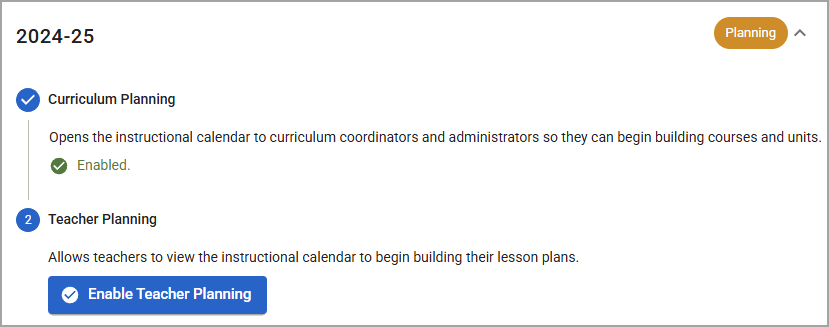
Users with the Create District Curriculum Courses right can enable planning for the next school year on the Instructional Calendar Management screen. There are two steps to enabling future planning:

  1. Curriculum Planning - First, you enable open the instructional calendar to curriculum coordinators and administrators. This allows users with the Create District Curriculum Courses right to create the scaffolding of next year’s curriculum by building out courses and units.

  2. Teacher Planning - Next, you open the instructional calendar to all users so that teachers can begin building lesson plans for the next school year.

Note: To start planning for next school year, the instructional calendar must be set up in Management. To learn how to set up the instructional calendar, see Creating the Instructional Calendar. If you do not have access to creating instructional calendars, contact your Eduphoria System Administrator to get this set up.

Note: The Create District Curriculum Courses right is required to access Staff Search.

Statuses in Instructional Calendar Management

Each instructional calendar listed on the Instructional Calendar Management screen includes the school year, a status bubble, and an expand/collapse arrow. The status bubble provides an at-a-glace view of the calendar’s current stage in the planning process.

  • Inactive - The calendar has been created in Management, but neither Curriculum Planning nor Teacher Planning are enabled.

  • Planning - Curriculum Planning is enabled. Teacher Planning is not enabled.

  • Active - Both Curriculum Planning and Teacher Planning are enabled.
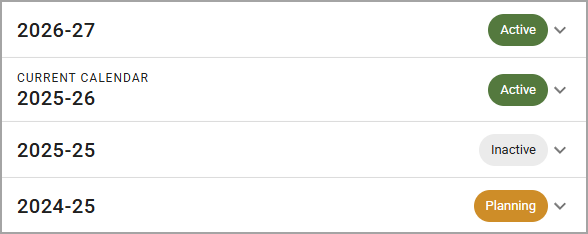
Expand a row to view the current stage in more detail and to manage the calendar.