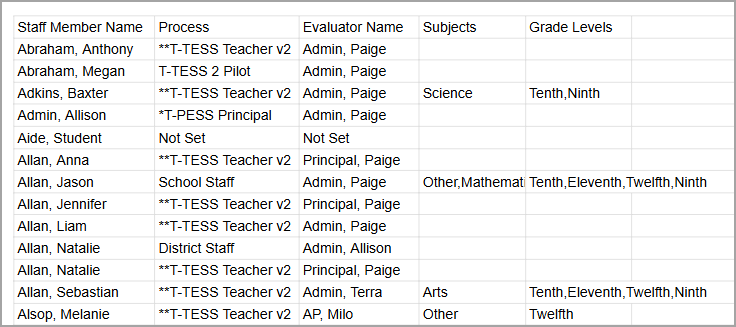
To track individual evaluation data, you can download a spreadsheet of School View data on the Staff () screen.
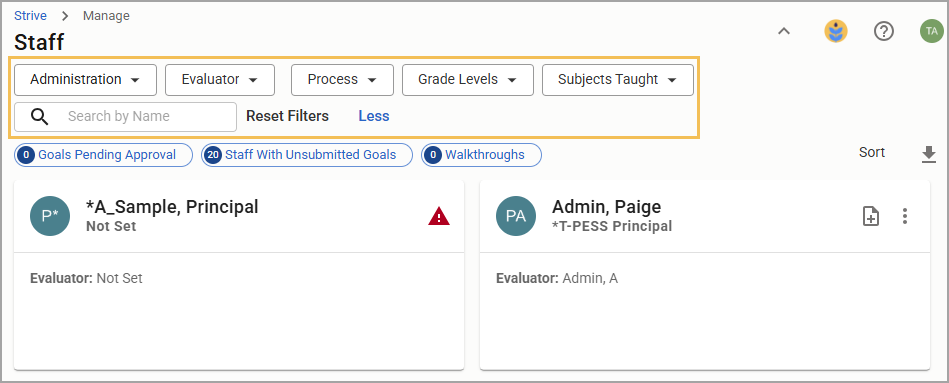
Filtering Staff
You can select filters by:
School
Evaluator (if given the role for viewing other evaluators at the school)
Process
Grade Levels
Subjects Taught
Search by Name
Downloading Filtered Staff
Select the Download Filtered Staff button to receive a spreadsheet of data matching your filtering rules.
.png)
Staff Data Spreadsheet
Data collected in the spreadsheet contains:
Staff Member Name
Process
Evaluator Name
Subjects taught by the staff member
Grade Levels taught by the staff member