Once an evaluator and a staff member both sign a document, even if one of them submits it as refused, the document cannot be unsigned or edited again.
Users must recreate the document as a new one and delete the signed document. Only users with the Appraisal Administrator role can delete or remove documents.
There are two ways to delete or remove a document:
Delete a document directly from the staff member’s evaluation process
Remove a document from Evaluation Options
Removing a Document From Evaluation Options
Quick Guide
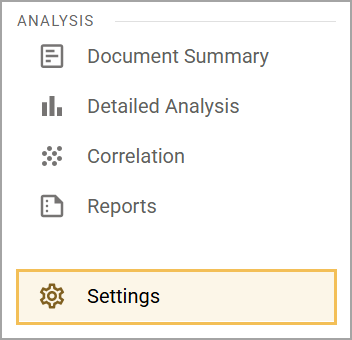
Select Settings () from the main menu.
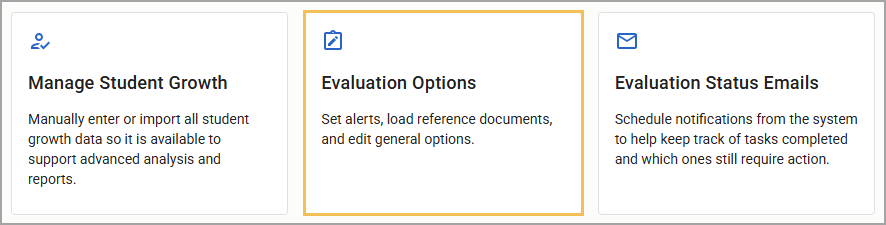
Select Evaluation Options.
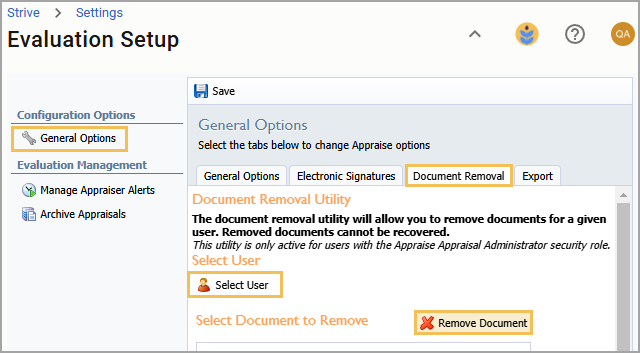
On the Evaluation Setup screen, select General Options.
Select the Document Removal tab.
Search for the appropriate staff member under Select User.
Choose the appropriate document(s), then select Remove Document.
Illustrated Guide
Step 1: Select Settings () from the main menu.
Step 2: Select Evaluation Options.
Step 3: On the Evaluation Options screen, select General Options.
Step 4: Select the Document Removal tab.
Step 5: Search for the appropriate staff member under Select User.
Step 6: Choose the appropriate document(s), then select Remove Document.