We have updated LockDown Browser to the latest Windows and Mac versions. To stay up-to-date on new LockDown Browser versions, click the Follow button at the top of this article.
Existing installs of LockDown Browser for Windows will automatically update to the new version. To obtain the latest versions, use the Check for Update feature or run the full installation program.
OS | Version Number |
|---|---|
Windows - Student Edition | 2.1.6.00 |
Windows - Lab Edition (MSI installer for managed installs) | 2.1.6.00 |
Mac OS - Student and Lab | 2.1.6.00 |
To download the latest version, select the Assessment Settings gear () in Aware and then select Configure LockDown Browser. Scroll down to the Lab Installer Links section and select the link for your system. Run the install.
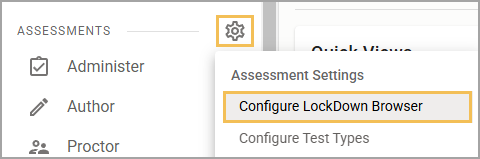
Note: To access Configure LockDown Browser from Assessments Settings, you must have the Create Local Assessment Tests right assigned to you at the district-level, meaning you have access to this right for all campuses. Roles and rights are configured by your Eduphoria system administrator in Management.