Eduphoria uses information from a district's Student Information System (SIS) to connect users with the students, courses, and classes they are associated with. To make this connection, a user's SIS account and Eduphoria user account must be linked.
Keeping these accounts correctly linked helps ensure that users have access to the appropriate students and classes and that Eduphoria applications are working with accurate, up-to-date roster information.
Although these accounts represent the same person, they serve different purposes.
The SIS User Account
An SIS account is the staff member's record in the district's Student Information System. The SIS is the district's primary source for information about students, staff, courses, class sections, and enrollment.
For example, a teacher's SIS record may identify the teacher as the instructor for several sections of 7th Grade Science. When the district's roster information is imported into Eduphoria, that information allows Eduphoria to identify the teacher's classes and the students enrolled in those classes.
Eduphoria receives roster information from the SIS through the district's configured rostering process. Depending on the district's configuration, this may use the Eduphoria Remote Roster Tool or another integration such as ClassLink OneRoster. Roster imports can include staff, students, courses, sections, terms, and roster entries.
The Eduphoria User Account
An Eduphoria user account is the account a staff member uses to access Eduphoria applications. The account determines the user's identity in Eduphoria and, along with the roles and rights assigned by the district, determines which Eduphoria applications and features the user can access.
User accounts can be created and managed in Management. Districts can create accounts individually, import accounts in bulk, or use integrations such as Active Directory, ClassLink, or SAML to help manage authentication and account creation.
An Eduphoria user account also contains information used throughout the platform, such as the user's name, email address, school assignments, role information, and other profile information.
Why link the accounts?
The SIS provides information about who a teacher is and which students and classes are associated with that teacher, while the Eduphoria account provides the user's identity and access to Eduphoria. Once the accounts are linked, Eduphoria uses the SIS roster information to associate the teacher with their students. This is particularly important in Aware, where teachers need access to the students and class sections assigned to them.
Example
Ms. Garcia teaches three sections of 8th Grade Science. She has an SIS account that identifies her as the teacher of those three class sections. She also has an Eduphoria user account that allows her to log in to Eduphoria and access Aware.
When the two accounts are linked, Eduphoria knows that the SIS record for Ms. Garcia belongs to the Eduphoria user account for Ms. Garcia. The roster information imported from the SIS can then associate her Eduphoria account with the appropriate courses, sections, and students.
If the two accounts were not connected, Eduphoria could not associate the roster with the correct Eduphoria user, so Ms. Garcia would not have access to her students’ data in Aware.
Linking an SIS Account to an Eduphoria User Account
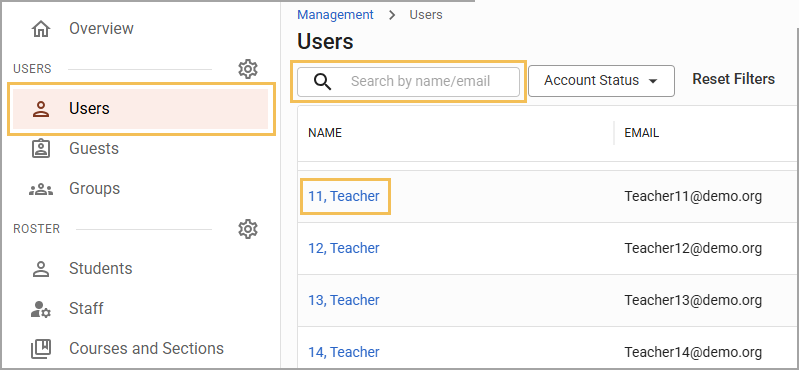
Select Users from the Users section of the main menu.
In the Users list, search for and select the staff member you want to edit.
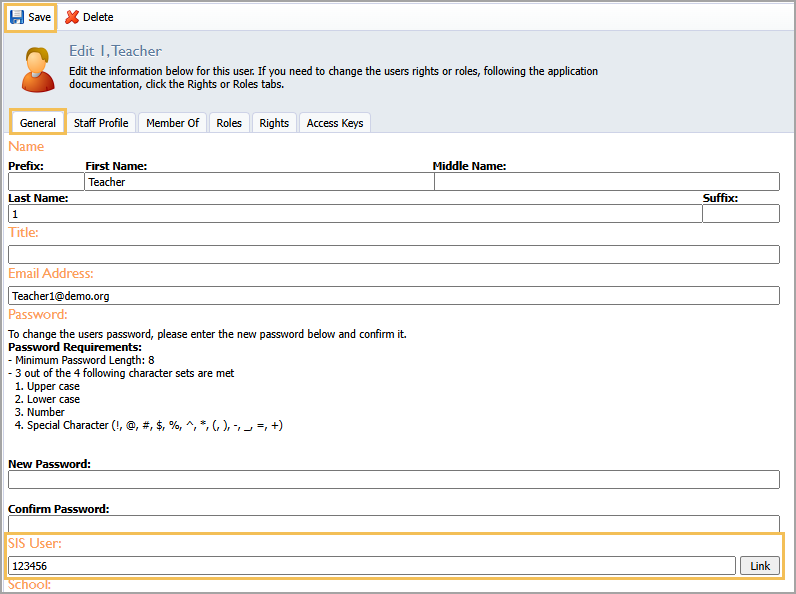
On the General tab, enter the staff member’s SIS account number in the SIS User field.
Select Link.
Select Save.
For more information about working with the user profile, see Users and Creating User Accounts.
Linking SIS Accounts to Eduphoria Accounts in Bulk
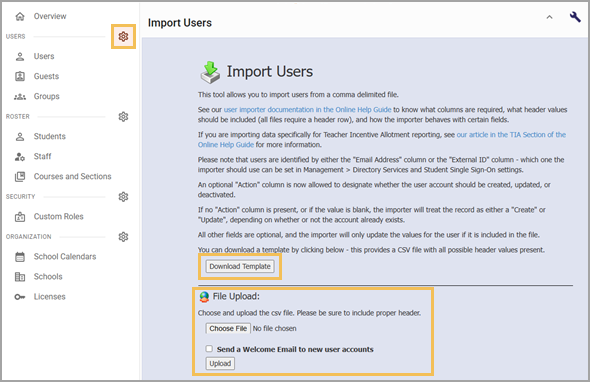
When preparing your import file, ensure that the External ID column contains the appropriate SIS account numbers. When the file imports, these IDs populate the SIS User field in the user profile.