The Management section of Beacon provides tools for overseeing system-wide structures and supporting district- or school-level configuration. This section is focused on searching staff planners, standardizing curriculum development tools, and planning ahead for future school years.
It includes four key screens:
Staff Search – Allows you to view staff members and access their planners. This is useful for identifying planner ownership and collaboration opportunities.
Templates – Enables the creation and management of templates for curriculum components or teacher plans. These templates help standardize expectations and ensure consistency across teachers, teams, or schools.
Strategies – Provides a space to create and manage instructional strategies that can be incorporated into lesson plans, supporting consistent instructional practices.
Instructional Calendars – Allows you to enable curriculum planning and teacher lesson planning for the selected instructional calendar.
Together, these screens make the Management section a central hub for maintaining consistency, supporting collaboration, and organizing key instructional components across the platform.
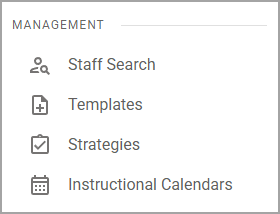
Screens in Management
Screen | Description | Access |
|---|---|---|
Staff Search ( assignment_turned_in ) | Allows administrators to view and search all Beacon users at their school or district by school, name, or email address. Selecting a row in the list opens the selected staff member’s planner. |
|
Templates ( note_add ) | Allows you to create and manage templates, which serve as a starting point or guide for developing new curriculum components or plans. |
|
Strategies ( assignment_turned_in ) | Allows you to create and manage strategies. A strategy is a custom tag that district users and curriculum owners can create for teachers and other curriculum-based users to apply to lessons and preps. |
|
Instructional Calendars ( calendar_month ) | Allows you to enable planning for the next school year on the Instructional Calendar Management screen. |
|